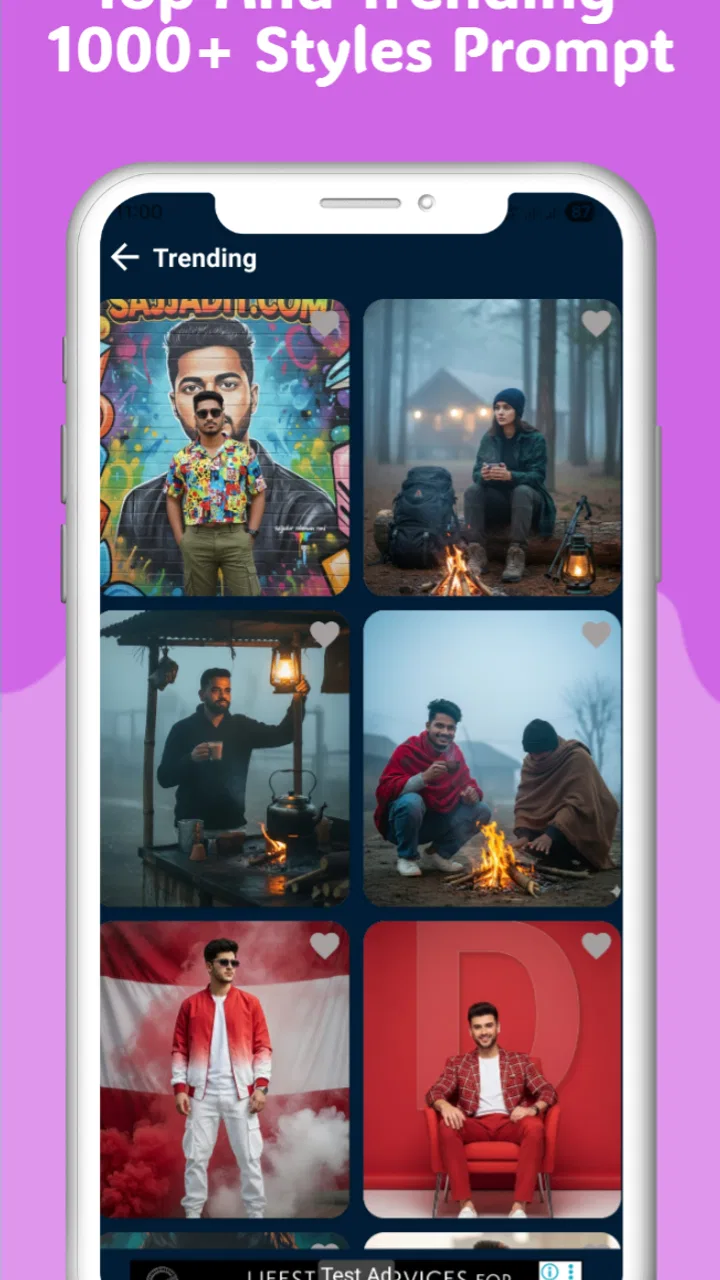
GoPrompt - Ai Image Prompt
- 4.3
- Rating
- 1.00M
- Installs
- Free
- Price

 Analysis by App-foxy
Creating an image from words sounds simple, but the useful test is what happens after the first prompt. I spent time looking at GoPrompt as a practical AI image app, not just as a novelty, and my impression is that it works best when you treat it as a fast idea generator rather than a complete photo-editing studio. You describe what you want, let the app interpret it, and then decide whether the result is good enough to keep or worth refining.
GoPrompt comes from Sajjad IT and sits in the photography category. It is free, aimed at Everyone, and currently listed as version 1.9 for devices running Android 9 or later. That combination makes it approachable for people who want to experiment without committing to a paid creative suite. Its store presence is also fairly substantial, with more than a million installs and an average rating of 4.3 from around thirteen thousand ratings.
That popularity does not automatically make every generated picture excellent, of course. AI image tools are highly sensitive to wording, subject complexity, and the visual style you request. What GoPrompt gives you is a convenient place to turn a sentence into an image, which can be surprisingly useful for brainstorming, social posts, mood boards, simple illustrations, and personal experiments.
You May Also Like

 Blood Strike: 2.5 Anniversary
Blood Strike’s Loadouts Turn Every Drop Into a Tactical Gamble
A close look at Blood Strike’s custom loadouts: how fast access to signature weapons reshapes its battle royale rhythm, rewards preparation, and narrows the gap between fights.

 Pandora - Music & Podcasts
Pandora’s Music Is Easy to Start, but Harder to Recover
Pandora’s strength is its low-effort path from a seed to a station. Its weak spot is how much confidence it asks you to place in connection, setup, and quiet recovery.

 8 Ball Pool
 Is Built on Rivalries, Rematches, and Routine
A close look at the rivalries, rematches, shared routines, and unanswered safety questions that turn a quick pool match into a persistent mobile community.

 Samsung Music
’s Quiet Strength Is Playing What You Already Own
Its reach comes less from spectacle than from dependable access to a personal library. That simplicity is both the app’s strongest retention engine and its ceiling.

 AccuWeather: Weather Radar
AccuWeather Review: A Quick, Clear Forecast for Everyday Decisions
For everyday plans, the best forecast is the one you can understand quickly. AccuWeather makes rain timing, radar, and local conditions easy to act on, with a few trade-offs.

 Hill Climb Racing
Why Hill Climb Racing Still Turns Crashes Into One More Run
A tiny car, a bumpy hill and one more upgrade: Hill Climb Racing keeps resurfacing because its simple chaos makes every near-miss feel personal.
More From Our News Desk
View All News


How GoPrompt feels during everyday use
I find GoPrompt easiest to judge when I treat it as a place to explore an idea, not as a camera or a finished-design tool. In everyday use, the useful question is whether a prompt gives me a visual direction worth developing; that also shapes how I approach the first session and choose a manageable subject.
Speed expectations before you start generating
The most important thing to understand is that text-to-image generation is not the same as opening a normal camera or gallery app. Typing a prompt is quick, but producing the image involves processing that can take longer than ordinary interface actions. I found it helpful to separate the app’s responsiveness from the generation process itself: the prompt-writing part should feel immediate, while the actual result naturally depends on the image request and the service behind it.
For a quick idea, I would keep the wording direct. A prompt such as “a small wooden cabin beside a misty lake at sunrise, warm natural colors” gives the system a clear subject, setting, time, and mood. Long paragraphs can be less useful because they mix priorities. When I want a predictable result, I put the main object first, then the environment, lighting, style, and important restrictions.
This is one of the less obvious lessons with GoPrompt: better prompts usually save more time than repeated random attempts. If the first instruction is vague, generating several more images may only produce different versions of the same misunderstanding. A short rewrite that changes the composition can be more effective than adding a handful of decorative adjectives.
What happens during heavier use
The app is most demanding when you are using it repeatedly rather than creating a single image and leaving. A session involving many variations can require patience, especially if you are comparing different descriptions for the same idea. I would not open it expecting the same low resource use as a basic notes app, because image generation is a heavier creative task by nature.
My preferred workflow is to decide what I am testing before starting: composition, color, character design, or atmosphere. For example, I might create one prompt for a product-style scene, then change only the background in the next attempt. This makes each generation informative. It also avoids wasting time on five nearly identical prompts that differ only in wording.
There is a practical benefit to this method when using a less powerful phone. Fewer unnecessary attempts mean less waiting and less pressure on the device. If your phone is older, close other demanding apps before a longer session and avoid treating GoPrompt like an unlimited image-production pipeline. The experience is more comfortable when you use it in short, deliberate bursts.
Another useful trick is to begin with a simple subject before asking for a crowded scene. A single object, a landscape, or a clear interior is easier to judge than a complicated scene with several people, signs, objects, and actions. Once you understand how the app interprets your wording, you can gradually add detail. This staged approach is especially helpful for beginners who otherwise cannot tell which part of a prompt caused an unwanted result.
Reliability and recovering from an imperfect result
Reliability here means more than whether the app opens. It also means whether the result follows the request closely enough to be useful. Like other generative image tools, GoPrompt should be judged by its ability to turn a clear concept into a workable visual, not by expecting exact control over every small detail.
I would be cautious with prompts that depend on precise lettering, exact layouts, or complicated relationships between several objects. If you need a poster with perfectly spelled text, a specific logo placement, or a technical diagram that must be accurate, a conventional design application is the safer choice. GoPrompt can help you explore the visual direction, but it is not the tool I would trust for final precision work.
When an image misses the point, recovery starts with diagnosis. If the subject is wrong, rewrite the opening of the prompt. If the mood is wrong, change the lighting and color language. If the composition is too busy, remove secondary objects instead of adding more instructions. This sounds basic, but it prevents a common mistake: trying to repair every problem in one enormous sentence.
I also recommend keeping a small record of prompts that produce a style you like. Even without treating the app as a professional production system, saving your own wording patterns can make later sessions more consistent. You may discover that describing a camera angle, material, or light source works better for your preferred subjects than simply naming an art style.
Device limits and who should be careful
Because the minimum operating system is Android 9, GoPrompt is available to a broad range of Android phones, although compatibility does not mean every device will feel equally comfortable. A newer phone with more spare memory will generally be a better environment for repeated creative sessions than an older entry-level model. I would especially avoid judging the app from a single rushed attempt on a device already struggling with several open applications.
Storage planning also matters for anyone who creates many images. Even when the generation process itself is handled elsewhere, the images you keep can quickly become a messy collection. I suggest reviewing the gallery after a session and deleting failed variations rather than allowing every experiment to accumulate. That is a simple habit, but it makes the app more useful over time.
GoPrompt is a better fit for someone who wants visual ideas without learning a complicated editor. It can suit a student preparing a presentation concept, a small creator looking for a background idea, or someone who wants to visualize a fictional setting. It is less suitable for a photographer who needs manual exposure controls, a designer who requires exact layers, or a business user who needs dependable brand consistency across many assets.
A realistic everyday scenario
Imagine I am preparing a social post about a weekend trip and want an atmospheric background rather than another ordinary stock image. I could ask for a quiet mountain road after rain, muted greens, soft overcast light, and an open area on one side for text. The useful part is not merely receiving a picture; it is being able to test the mood before I spend time designing the post around it.
If the first result places the road in the center and leaves no room for text, I would revise the composition directly: ask for the road along the lower edge and clear negative space in the upper corner. That is a more practical instruction than saying “make it better.” The app becomes a visual planning tool, helping me decide what kind of image I need before moving to a more precise editor.
For a small business, I would use the same approach for early concepts, not final advertising artwork. A café owner might explore a warm illustrated scene for a seasonal menu, then hand the chosen direction to a designer. This saves brainstorming time while acknowledging that generated imagery may still need careful review before it represents a real brand or product.
How it compares with familiar photography alternatives
Compared with a normal camera app, GoPrompt is not about capturing a real moment. It is about inventing one from language. That makes it useful when the scene does not exist, when a location is unavailable, or when you want several visual directions without arranging a shoot. The trade-off is authenticity: an AI-created image should not be presented as a real photograph when that distinction matters.
Compared with a standard photo editor, the app removes much of the manual work at the beginning. You do not need to start with a blank canvas and build every element yourself. On the other hand, an editor gives you more dependable control over cropping, retouching, typography, layers, and exact placement. My practical combination would be GoPrompt for exploration and a conventional editor for finishing.
Compared with browsing stock photography, text generation can be more flexible because you can describe an unusual setting or specific atmosphere. Stock images are often better when you need a recognizable real person, a genuine location, or a polished commercial photograph with predictable details. The right choice depends on whether originality or factual realism matters more for the project.
Small prompt habits that improve the experience
I get better results when I write prompts in a consistent order: subject, action or arrangement, setting, lighting, mood, and visual treatment. For example, I might describe “a red bicycle leaning against a brick wall,” then add the time of day and the desired framing. This structure makes it easier to identify what needs changing after each attempt.
It also helps to avoid contradictory instructions. Asking for both dramatic hard shadows and evenly diffused light gives the app competing signals. Likewise, combining photorealism, watercolor, clay animation, and technical blueprint language in one request may create an unclear visual identity. I would choose one dominant treatment and add only details that support it.
For portraits or scenes with several people, I would inspect faces, hands, clothing details, and object relationships carefully before sharing the image. A picture can look convincing at first glance while containing small visual errors. This is not a reason to dismiss the app; it is a reason to use it for concepts and creative drafts rather than assuming every output is publication-ready.
Who should download it, and who should skip it
I would recommend GoPrompt to anyone curious about turning plain-language ideas into images, especially if the goal is experimentation rather than exact production control. The free price makes it easy to try, and the Everyone rating keeps it accessible for general creative use. Its strongest appeal is the low barrier: you can begin with an idea instead of learning a complicated set of tools.
I would skip it if your main need is traditional photography. It will not replace camera controls, genuine lighting, lens choices, or the personal value of capturing a real scene. I would also choose another tool if your work depends on exact text, repeatable brand assets, detailed retouching, or strict technical accuracy.
The developer, Sajjad IT, has kept the concept focused: enter a description and explore the result. That simplicity is both the attraction and the limitation. There are fewer decisions at the start, but you also have to accept that the app interprets your request instead of giving you complete manual control.
My performance verdict after using the app
GoPrompt is most convincing as a lightweight creative companion for visual brainstorming. Its perceived speed is best when prompts are focused and sessions are organized, while heavy repeated generation should be approached with reasonable patience and attention to the phone being used. I would not measure its value by how quickly it produces a single image; I would measure it by whether it helps me reach a useful visual idea with less effort than starting from nothing.
Version 1.9, the free model, Android 9 minimum, and broad Everyone rating make it an easy app to test for casual image creation. The audience size, with over a million installs and a 4.3 average, suggests that many people find the basic concept worthwhile, although popularity cannot remove the need to inspect individual results.
My final recommendation is straightforward: try it when you need an imagined scene, a mood reference, or a starting point for a creative project. Use clear prompts, change one variable at a time, and review every image before treating it as finished work. GoPrompt is at its best when it turns a vague idea into a visual direction, not when it is asked to replace a camera, designer, or precision editor.
FAQs for GoPrompt - Ai Image Prompt
01What is GoPrompt - AI Image Prompt, and what can I use it for?
GoPrompt - AI Image Prompt is designed to help users create, improve, and organize text prompts for AI image generators. It can be useful when you have a general idea but are unsure how to describe the subject, artistic style, lighting, camera angle, mood, or composition. The app is mainly a prompt-writing companion rather than a complete image-generation studio, so the final artwork may need to be created in a separate compatible AI image tool.
02Is GoPrompt - AI Image Prompt suitable for beginners?
Yes, the app can be helpful for beginners who are still learning how to write effective AI image prompts. Instead of requiring detailed knowledge of prompt structure, it guides users toward describing important visual elements such as characters, environments, colors, styles, and atmosphere. However, users may still need to experiment with wording and settings because different image generators interpret prompts differently and may produce inconsistent results.
03Does GoPrompt generate images directly, or does it only create prompts?
GoPrompt primarily focuses on generating or refining prompts for AI image creation. Depending on the version and available integrations, it may offer tools for copying, sharing, or sending prompts to another service, but it should not automatically be considered a full image-generation app. Before downloading, check the current store description and permissions to confirm whether direct image creation is included in the version available for your Android or iOS device.
04Is GoPrompt - AI Image Prompt free to use?
The availability of free features, usage limits, advertisements, and optional premium tools can vary by platform and app version. Basic prompt creation may be available without payment, while advanced templates, unlimited generations, saved collections, or additional customization options could require an in-app purchase or subscription. We recommend reviewing the pricing section in the official app store before using premium features, especially if subscriptions renew automatically.
05Does GoPrompt protect my prompts and personal information?
When using GoPrompt, remember that prompts may be processed through online services, particularly when AI-powered rewriting or generation features are involved. Avoid entering private information, confidential business details, or personally identifiable data into prompts unless you have reviewed the developer’s privacy policy and understand how the information is handled. Also check the requested permissions, account requirements, data collection practices, and deletion options before relying on the app for sensitive creative work.
Pros
- Generates varied prompt ideas for different image styles and subjects.
- Helps beginners learn how to structure more descriptive AI image prompts.
- Saves time compared with writing detailed prompts from scratch.
- Useful for brainstorming when you have a rough visual concept in mind.
- Simple interface makes prompt creation accessible on mobile devices.
Cons
- Generated prompts may need editing to match a specific image generator.
- Results can feel repetitive when requesting similar concepts frequently.
- Some advanced features may require payment or in-app purchases.
- Prompt quality depends heavily on the clarity of your initial input.
- It may not support every AI image model's preferred prompt format.

GoPrompt - Ai Image Prompt
Gallery